Best Cat Cameras to Watch Your Pet While You’re Away (2026 Guide)
By Demosthenes Staudinger | Updated August 29, 2026
Affiliate disclosure: This article contains affiliate links. As an Amazon Associate I earn from qualifying purchases. If you buy through one of these links, we may earn a commission at no additional cost to you. This does not affect our editorial recommendations.
Leaving a cat at home can make even an experienced owner wonder what is happening behind the front door. Is the cat sleeping, waiting by the entryway, ignoring lunch, or investigating a forbidden houseplant?
A well-chosen camera can provide live video, alerts, two-way audio, treat dispensing, laser play, or a mobile room-to-room view. Those features can help check routines, confirm that an automatic feeder operated, or give a pet sitter useful information.
It cannot guarantee less loneliness, prevent destructive behavior, diagnose illness, or replace in-person care. Cats need predictable resources and opportunities to hide, scratch, climb, play, and interact with trusted people. Technology is one part of that environment—not a substitute for it. [10]
The three products solve different problems. The Furbo 360° Cat Camera is a stationary treat-tossing camera, but the linked version requires a paid plan. The ZUMIMALL BK07 combines a remote laser with microSD storage. The Enabot ROLA PetPal is a mobile robot that, in the linked configuration, dispenses treats.
The right choice depends on the interaction you want, plus your Wi-Fi, floor plan, privacy expectations, subscription tolerance, and cat’s response to the device.
This guide compares the best cat cameras using documented features, meaningful limitations, and the homes each model actually suits.
How we reviewed the best cat cameras: This is a research-based editorial comparison, not a hands-on test. We evaluated current manufacturer specifications, official manuals and support resources, return and warranty policies, authoritative feline-welfare and safety guidance, and simpler alternatives. Modern Cat Society has not yet purchased or field-tested these products. Manufacturer performance claims are identified as such.
We applied the same criteria to each camera:
Visibility: stated resolution, field of view, movement, night vision, and likely blind spots.
Interaction: treat delivery, laser controls, audio, mobility, and what requires an add-on or plan.
Connectivity: supported Wi-Fi bands, app dependence, local storage, and cloud services.
Cat suitability: noise, movement, placement, treat limitations, and opportunities for gradual introduction.
Claim quality: whether a feature is clearly documented, conditional, internally inconsistent, or primarily a manufacturer claim.
Product configurations can change. Confirm the exact model, included modules, app requirements, plan price, and seller before ordering.
Quick Verdict
Editorial verdict: The Furbo 360° Cat Camera is the strongest stationary treat-camera choice if you accept its mandatory plan and 2.4 GHz Wi-Fi. Choose ZUMIMALL BK07 for laser interaction and local storage, or Enabot ROLA PetPal for mobile viewing on compatible floors.
Best for: Owners who will use pet-specific interaction—not merely check a live feed—and whose cat responds calmly to treats, audio, a laser, or a moving robot.
Skip it if: You need only one reliable view, dislike subscriptions or vendor apps, have weak Wi-Fi, or cannot safely supervise interactive features. A standard indoor security camera may be simpler.
Cat Camera Comparison at a Glance
Feature
Furbo 360° Cat Camera
ZUMIMALL BK07
Enabot ROLA PetPal
Best use
Stationary monitoring and treat tossing
Stationary monitoring and laser interaction
Mobile monitoring and optional treat interaction
Stated video
1080p Full HD
Official page variously says 4MP, 3MP, and 2K
2.5K / 5MP, 2880 × 1620
Camera movement
360° rotating view with auto tracking
355° pan and 120° tilt with auto tracking
Wheeled movement plus 135° camera angle
Night vision
Color night vision
Night vision listed
Infrared night vision listed
Two-way audio
Yes
Yes
Yes
Cat interaction
Treat toss; feather attachment
App-controlled and scheduled laser paths
Treat module; pet call button; optional toy module varies by bundle
Size and weight
8.8 × 4.9 × 4.9 in; 1.7 lb
Not consistently stated on the current official page
About 7.6 × 6.7 × 4.7 in; about 2.26 lb including listed modules and dock
Power
Plug-in, two-meter USB-C cable
Plug-in
3,500 mAh battery; manufacturer-listed 2–8 hours
Wi-Fi
2.4 GHz only
2.4 and 5 GHz
2.4 and 5 GHz
Storage
Cloud features tied to Furbo Nanny
microSD up to 128GB or cloud
Expandable storage stated as 16–256GB; cloud plan available
Recurring cost
Paid Furbo Nanny plan required for linked version
Cloud service may cost extra; local card can reduce dependence
Cloud+ features may cost extra
Main limitation
Mandatory plan and no 5 GHz support
Conflicting official video specifications
Floor obstacles, battery limits, and bundle complexity
Best placement
Open tabletop with clear treat path
Stable shelf or counter with controlled laser area
One level with clear floors and protected stairs
Current price
Price checked August 29, 2026; verify current pricing
Price checked August 29, 2026; verify current pricing
Price checked August 29, 2026; verify current pricing
Specifications above come from the manufacturers and may vary by region, firmware, bundle, and retailer. [1] [6] [8]
What Is a Smart Cat Camera?
A smart cat camera is an internet-connected indoor camera with an app and, sometimes, pet features such as treats, alerts, laser play, or mobile navigation.
Unlike a basic webcam, a pet camera is designed around remote interaction. That can be useful, but the label “smart” does not mean the device understands a cat, evaluates health, or makes care decisions. Recognition and alert features classify patterns imperfectly; the owner still interprets what the footage means.
How Do Smart Cat Cameras Work?
The camera connects to a router and sends its feed through the manufacturer’s app or cloud infrastructure. Motion may trigger a notification or recording, while phone commands can activate audio, lens movement, treats, a robot, or a laser.
Remote access depends on power, internet service, router compatibility, app availability, account security, and continued platform support. Cloud history may require a subscription. Local storage can reduce cloud dependence but may not eliminate internet or account requirements.
A fixed unit can miss a cat behind furniture or in another room. A robot extends coverage, but stairs, doors, rugs, cords, thresholds, and the cat’s tolerance limit it.
A camera provides information—not medical certainty. Appetite loss, breathing difficulty, repeated vomiting, straining to urinate, collapse, or marked behavior change warrants prompt veterinary guidance rather than app-based observation.
1. Furbo 360° Cat Camera: Best for Treat Interaction
The Furbo is the most cat-specific stationary model here. Official specifications include a rotating 360-degree 1080p camera, four-times digital zoom, color night vision, two-way audio, auto tracking, a meowing alert, treat tossing, and a feather attachment. Furbo lists dimensions of 8.8 by 4.9 by 4.9 inches, a 1.7-pound weight, capacity for about 100 compatible treats, a two-meter USB-C cable, and a one-year warranty on its comparison page. [1]
How the Furbo Works
Place it on a stable surface with an open view and clear treat path. The app provides live video, audio, rotation, tracking, and remote treat control.
A toss can reward calm approach or help confirm responsiveness. Treats must fit the size guidance, and their calories count toward the daily allowance.
Rotation cannot see through furniture or into another room. Avoid launching treats toward stairs, breakables, or cats likely to compete.
The Subscription Is a Buying Requirement, Not a Footnote
The supplied Amazon listing identifies a subscription-required Furbo. Furbo says this category needs a new Furbo Nanny plan to complete setup, with live view locked until activation. A plan attached to another Furbo may not bypass that step. Subscription-optional models have different terms. [2]
Furbo describes minimum-term conditions for certain offers, including a three-month commitment. Compare the full first-year cost on the listing and activation screen. [4]
Furbo’s comparison page lists a one-year warranty, while its subscription-required plan page advertises a lifetime-warranty benefit. Eligibility may depend on promotion, plan status, seller, region, or generation. Save the checkout terms and confirm coverage. [1] [4]
Connectivity and Practical Limits
Furbo supports 2.4 GHz Wi-Fi, not 5 GHz. A dual-band router can work through its 2.4 GHz network; a 5 GHz-only setup is incompatible. [3]
Test two-way audio at home and keep the volume low. If the cat freezes, hides, or searches frantically for the unseen speaker, use it less often.
Best for: An owner who values treat tossing, broad stationary coverage, and a mature pet-camera feature set more than subscription avoidance.
Skip it if: You refuse recurring fees, need 5 GHz-only connectivity, want local recording, or have cats that become competitive when treats scatter.
2. ZUMIMALL BK07: Best for Laser Play and Local Storage
This guide evaluates the current BK07.
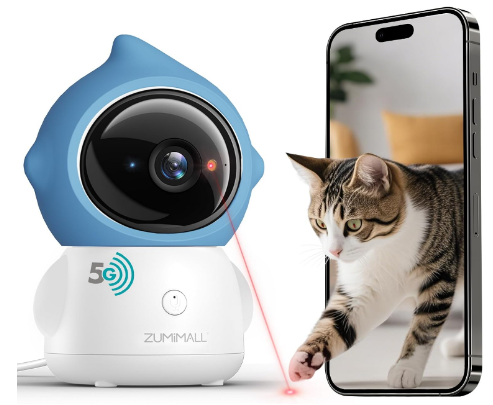
ZUMIMALL lists 355-degree pan, 120-degree tilt, tracking, two-way talk, one-touch calling, app-controlled and scheduled laser paths, upward-facing privacy mode, 2.4/5 GHz Wi-Fi, microSD support up to 128GB, cloud storage, multi-user access, and Alexa, Google, and ONVIF compatibility. [6]
Why the BK07 May Be the Practical Value Pick
Local storage and dual-band Wi-Fi distinguish the BK07 from Furbo. A microSD card enables on-device recording, although it may not be included and some app functions still depend on vendor servers. Verify current cloud charges.
The app can direct the laser manually or use paths and schedules. Treat this as brief enrichment, not guaranteed unattended exercise or a cure for boredom.
Finish by directing the cat toward a physical toy or food reward it can catch. That gives the predatory sequence an outcome the dot cannot provide. [10]
Do Not Assume the Laser Is “Eye-Safe”
We did not find clear independent documentation of laser class or output in the accessible materials. The FDA warns that direct viewing can be hazardous depending on power and classification. Avoid eyes, reflective surfaces, windows, stairs, and traffic areas; stop use if pointing becomes unpredictable. [12]
Scheduled play deserves extra caution because nobody may be present to notice an unsafe beam or frustration. Manual sessions through the live view provide more control, while human-led wand play should remain in the routine.
The Official Resolution Descriptions Conflict
ZUMIMALL’s page variously says 4MP, 3MP, and 2K FHD. Those labels do not prove one exact sensor specification. [6]
Confirm the Amazon model and specification, then check the packaging and manual. Pixel count alone does not guarantee better footage; compression, lighting, lens quality, bitrate, and connection stability matter.
The BK07 remains reasonable if its feature combination matters more than documentation clarity.
Returns and Warranty
ZUMIMALL’s detailed direct-store policy differs from its broad “30-day money-back” banner. It generally permits an opened unwanted-item return within 15 days; 30 days applies to unopened items. The customer usually pays non-defective return shipping, and inspection can produce a restocking fee up to 15 percent. Direct-store cameras receive a one-year limited warranty and a stated six-month extension after qualifying registration. [7]
For this Amazon purchase, rely on the order’s displayed seller and return deadline.
Best for: Buyers who want pan-and-tilt coverage, a controlled laser option, dual-band Wi-Fi, and microSD storage without a treat mechanism.
Skip it if: Conflicting specifications concern you, you need transparent cloud pricing before setup, or nobody can supervise the cat’s response to laser play.
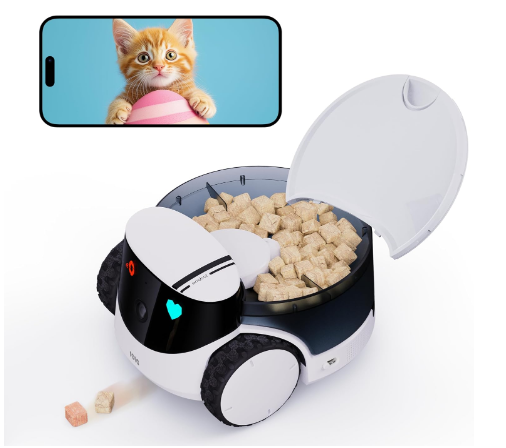
The Enabot ROLA PetPal moves across the floor instead of remaining on a shelf. The linked title specifies a treat dispenser, while Enabot sells other module bundles. Verify the Amazon package rather than assuming every pictured accessory is included.
Enabot lists a 2.5K/5MP camera (2880 by 1620), infrared night vision, a 135-degree camera angle, two-way communication, a pet call button, prerecorded voice, dual-band Wi-Fi, a 3,500 mAh battery, and estimated two-to-eight-hour operation. It supports 16–256GB expanded memory; Enabot describes a 32GB card with its standard configuration, but retailer bundles vary. [8]
What Mobility Adds
Remote driving extends viewing beyond one sightline across compatible rooms on the same level. The call button lets a trained or curious cat initiate contact, but not every cat will use it.
The module accepts manufacturer-specified treats under 12 millimeters and reportedly releases about three to five freeze-dried pieces. Test delivery at home and count the calories.
Close-range charging is not guaranteed whole-home autonomy. Enabot states 15-millimeter obstacle crossing and a 15-degree climbing angle, but thresholds, rugs, cables, furniture gaps, stairs, clutter, and doors can stop or endanger it. [8]
It Is a Robot, So Introduction Matters
Enabot reports 56.4–63.7 dB at 30 centimeters under its test conditions; flooring, speed, acoustics, and distance change perceived noise. A moving robot can be more intrusive than a stationary lens.
Introduce PetPal powered off, then move it slowly while the cat has an escape route and elevated refuge. Never chase, block a doorway, or approach feeding and litter areas. If the cat hides, crouches, or avoids the room, stop active movement.
Block stair edges and clear cords, liquids, fragile objects, and small items. Obstacle avoidance does not make the robot fall-proof.
Storage, Cloud Features, and Ongoing Cost
Enabot promotes Cloud+ for extended playback, notifications, and generated pet moments. Because one stable price was not verifiable across regions, inspect the in-app offer if cloud history matters.
Enabot lists a one-year warranty. Its direct store permits no-reason returns within 14 days, with buyer-paid non-quality shipping, plus a seven-day process for damaged, different, or nonfunctional arrivals. Amazon orders follow Amazon’s policy. [8] [9]
Best for: A one-level home where the cat uses several open rooms and the owner specifically values remote driving and modular interaction.
Skip it if: Your home has unprotected stairs, thick rugs, cluttered floors, frequent closed doors, a robot-sensitive cat, or a preference for simple set-and-forget monitoring.
Resolution is only one part of monitoring. A stable, well-placed 1080p Furbo stream can be more useful than higher-resolution video compressed by a weak connection. ZUMIMALL’s conflicting labels make pixel-level comparison unreliable.
Match the camera to the scene:
Pan-and-tilt models suit an open room, feeder, or window area.
Treat cameras need a clear launch path.
Laser cameras need a matte, obstacle-free area without reflections.
Mobile cameras work best on one open level.
“Color night vision” generally needs some ambient light, while infrared can create eye reflections and reduced color detail. Test the intended room at the relevant time.
Avoid bright-window backlighting. A protected corner near standing cat-eye level often captures more useful activity than a ceiling view.
Alerts, Audio, and What “AI Detection” Really Means
Tracking and pet alerts are not infallible intelligence. Shadows, curtains, people, or other pets can trigger events, while a cat outside the detection zone may generate none.
Treat notifications as prompts, not proof of normality or illness. Review several clips and adjust placement or detection zones when needed.
Some cats approach two-way audio; others become unsettled. Test short phrases at low volume while someone observes the cat, and avoid repeatedly calling an animal that cannot find you.
Meow alerts cannot interpret motive. A meaningful change in vocal frequency or tone deserves real-world assessment.
Privacy and Cybersecurity: The Feature Every Buyer Should Evaluate
An indoor camera can capture household conversations, routines, family members, visitors, security systems, and valuables. The risk is not unique to pet cameras, but playful features should not distract from the fact that these are networked cameras and microphones.
The Federal Trade Commission recommends securing home cameras with strong unique passwords, software updates, two-factor authentication when offered, encryption, a protected home network, and secure access to the camera’s webpage or app. [11]
Before setup:
Create a unique account password that is not reused anywhere else.
Enable two-factor authentication if the manufacturer provides it.
Update the camera, app, phone, and router firmware.
Review who can access shared video and remove old users promptly.
Disable unnecessary recordings, microphones, alerts, and cloud retention.
Avoid placing the camera where it can see computer screens, alarm keypads, bathrooms, bedrooms used by guests, or private documents.
Use privacy mode or unplug the camera when monitoring is unnecessary.
Review the company’s current privacy policy, data-retention terms, deletion process, and account closure procedure.
Local microSD recording does not automatically make a device private. The app may still use cloud servers for authentication, live viewing, notifications, or diagnostics. Conversely, a subscription does not automatically make a service insecure. The important questions are what data is transmitted, how it is protected, how long it is kept, who can access it, and whether the owner can delete it.
If you would be uncomfortable with a clip leaving the home, position the camera accordingly.
Cat Welfare and Interaction Safety
Pet cameras can enrich a routine, but more interaction is not always better. A cat should be free to leave the camera’s area, and no device should repeatedly pursue, startle, wake, or lure the animal.
Treat Safety
Use only treats that match the dispenser’s documented size and texture. Test for jams while present, clean food-contact parts on schedule, and never use the camera as the sole source of a medically necessary meal. In multi-cat homes, scattered food can trigger chasing or guarding. Separate interactive sessions if one cat blocks another, eats a prescription diet, or requires controlled calories.
Laser Safety
Never direct a laser into eyes or toward reflective surfaces. Avoid staircases, balconies, hot appliances, breakables, and slippery areas. Keep sessions short, supervise through the live view, and finish with something physical the cat can catch. If laser play produces frantic searching or persistent fixation after the session, stop using it and choose wand toys, tossed mice, or food puzzles instead. [12]
Robot Safety
Introduce movement in stages, preserve escape routes and high resting places, and block stair edges. Do not drive toward a cat who is eating, eliminating, sleeping, hiding, or cornered. Obstacle avoidance is an aid, not permission to leave hazards on the floor.
Human Care Still Matters
Environmental guidance for cats emphasizes safe resting places, separated essential resources, opportunities for play and predatory behavior, and predictable positive human interaction. A camera may support those needs by showing patterns or enabling a brief interaction, but it cannot provide clean water, scoop litter, identify illness, rescue a trapped animal, or offer the full sensory and social experience of a trusted person. [10]
For travel, arrange a reliable person to check the cat at least as often as the cat’s age, health, medications, diet, and local welfare expectations require. Kittens, seniors, medically vulnerable cats, and cats receiving medication need more direct supervision than an app can provide.
Return Policy, Warranty, and Recurring Costs
Question
Furbo 360° Cat Camera
ZUMIMALL BK07
Enabot ROLA PetPal
Mandatory recurring cost
Yes for the subscription-required version linked
Not clearly mandatory; cloud storage may cost extra
Not clearly mandatory; Cloud+ may cost extra
Other likely costs
Compatible treats and continuous plan
microSD card if not included; possible cloud plan
Treats, optional modules, possible memory card or cloud plan
Direct return summary
RMA requested within 30 days; Amazon follows Amazon policy
Detailed direct policy generally gives 15 days for opened unwanted items and 30 days for unopened items
Direct no-reason return within 14 days; Amazon follows Amazon policy
Direct warranty summary
Official pages differ between one year and a subscription-linked lifetime benefit
One year, with stated six-month extension after eligible registration
One year listed
Key action before purchase
Verify plan term, renewal cost, warranty eligibility, and authorized seller
Verify exact resolution, seller, cloud fee, and return window
Verify included module, memory card, cloud fee, and floor compatibility
Return and warranty terms depend on seller, region, condition, registration, and date. Amazon’s order page governs an Amazon purchase, while manufacturer policies generally govern direct orders. Keep the packaging until the device has been fully tested on your Wi-Fi and in the intended room. [5] [7] [9]
Return rights and warranty coverage solve different problems. A return window helps when the cat rejects the device or it does not fit the home; a warranty generally addresses covered defects after that window. Neither automatically refunds subscriptions, cloud fees, return freight, treats, memory cards, or optional modules.
Furbo 360° Cat Camera vs. Furbo Mini 360°
Furbo’s own lineup includes a smaller alternative that changes the value calculation. The current Furbo Mini 360° is manufacturer-listed at 3.6 × 3.5 × 3.5 inches and 0.3 pounds, with 2K QHD video, a rotating 360-degree view, eight-times digital zoom, color night vision, tracking, audio, meow alerts, and a lighter treat mechanism holding up to 10 small treats. The full Furbo 360° Cat Camera is larger, uses 1080p video and four-times digital zoom, holds about 100 treats, and adds the cat-specific feather attachment. [1]
Criterion
Furbo 360° Cat Camera
Furbo Mini 360°
Best setting
Open living area
Small room, desk, or travel setup
Stated video
1080p, 360° rotation, 4× zoom
2K QHD, 360° rotation, 8× zoom
Treat capacity
About 100 compatible treats
Up to 10 small treats
Cat-specific accessory
Feather attachment
None listed
Footprint
8.8 × 4.9 × 4.9 in; 1.7 lb
3.6 × 3.5 × 3.5 in; 0.3 lb
Subscription
Furbo Nanny terms depend on version and offer
Furbo Nanny terms depend on version and offer
Choose the full Cat Camera when treat capacity and the cat-oriented attachment matter. The Mini 360° is more logical where space and stated video resolution matter more than treat capacity. Confirm whether the exact Mini or full-size listing is subscription-required, because Furbo sells versions with different activation terms. [2]
Smart Cat Camera vs. Standard Indoor Security Camera
Criterion
Pet-Specific Camera
Standard Indoor Camera
No Camera and In-Person Care Only
Live observation
Yes
Yes
No remote view
Treat or laser interaction
Depending on model
Usually no
Human-controlled play and feeding
Mobility
Enabot only in this comparison
Usually stationary
Caregiver moves freely
Pet alerts
May be available or plan-gated
General motion alerts; pet detection varies
Direct observation during visits
Complexity
Food cleaning, modules, or subscriptions may apply
Usually simpler
Requires scheduling and trusted access
Best role
Supplemental interaction and monitoring
Simple passive monitoring
Essential physical care and welfare checks
A standard indoor camera is often the better lower-cost alternative when the goal is simply to check a feeder, doorway, or favorite bed. In-person care remains the traditional and necessary solution for food, water, litter, medication, safety, and meaningful companionship. A pet camera can supplement either option; it cannot replace the caregiver.
Pros and Cons
Pros
Considerations
Three distinct interaction styles cover treat, laser, and mobile use cases
None replaces a sitter, daily care, or veterinary assessment
Furbo provides a cat-oriented treat-tossing experience
Linked Furbo requires a paid plan and 2.4 GHz Wi-Fi
Furbo’s rotating lens covers more of an open room than a fixed lens
A 360-degree lens still has furniture and room-boundary blind spots
ZUMIMALL supports both 2.4 and 5 GHz Wi-Fi
Its official product page conflicts on 4MP, 3MP, and 2K labels
ZUMIMALL supports microSD recording up to 128GB
Cloud pricing and laser-class documentation are not sufficiently clear in accessible materials
Manual laser control can create a short remote play opportunity
Direct eye exposure, reflections, unsafe routing, and frustration must be prevented
Enabot can be driven beyond a single stationary viewpoint
Stairs, rugs, cords, thresholds, doors, and battery life restrict mobility
Enabot supports dual-band Wi-Fi and expandable storage
Treat and interactive-toy functions depend on the included module
Each model offers two-way communication
Hearing a disembodied voice can confuse or stress some cats
Alerts can reveal changes in routine worth checking
Detection errors and missed events make alerts unsuitable as medical proof
Who Should Buy a Smart Cat Camera?
Choose the Furbo 360° Cat Camera if treat tossing is the feature you will actually use, the monitoring area is one open room, and you accept the subscription-required model’s ongoing plan. It is the easiest recommendation for an owner seeking a cohesive pet-specific experience, but its total cost and 2.4 GHz limitation should be decided before—not after—purchase.
Choose the ZUMIMALL BK07 if you want pan-and-tilt monitoring, dual-band Wi-Fi, microSD storage, and occasional laser interaction. It is the strongest functional value in this group, provided you are comfortable verifying the exact resolution and treating the laser as a controlled tool rather than autonomous entertainment.
Choose the Enabot ROLA PetPal if a fixed view cannot cover the cat’s preferred spaces and your home has one robot-friendly level. Its mobility and modular design are distinctive, but it requires more setup, hazard control, charging, and behavioral acclimation.
Choose a standard indoor security camera instead if your priority is simply confirming that the cat entered a room, checking a feeder, or viewing a litter area. Pet-specific dispensers and play features add complexity, food maintenance, and sometimes subscriptions. A familiar home-security platform may offer a clearer privacy model and lower total cost.
Choose no interactive device if your cat becomes distressed by mechanical sounds, remote voices, moving dots, or robots. More features do not create more value when the animal avoids the room.
How to Get the Most From a Smart Cat Camera
Test the Network Before Final Placement
Confirm the supported Wi-Fi band and signal where the device will sit or drive. Furbo requires a 2.4 GHz network. A router adjustment or mesh point may be needed for a dead zone.
Introduce the Device While You Are Home
Let the cat inspect the silent device first. Add power, lens movement, audio, food, laser, or robot motion one feature at a time. Aim for calm curiosity.
Frame a Meaningful Area
Frame a resting perch, open play area, feeder, or hallway. Keep treat trajectories away from other resources, stairs, and fragile decor.
Establish an Interaction Routine
Use a consistent cue before treats or play. Keep remote sessions brief and preserve ordinary human-led play.
Review Calories and Competition
Measure each release and coordinate app use. In multi-cat homes, confirm who receives the food; disable unattended dispensing if access cannot be controlled.
Secure the Account
Use a password manager, turn on two-factor authentication if offered, keep software current, restrict shared accounts, and periodically delete footage you no longer need. [11]
Build a Backup Plan
Food, water, medication, temperature control, and human check-ins must never depend solely on the camera. Give the sitter written instructions and an emergency contact.
Frequently Asked Questions
1. What is the best cat camera in 2026?
For treat interaction, our research-based pick is the Furbo 360° Cat Camera, provided you accept the mandatory subscription attached to the supplied listing. ZUMIMALL is more appealing for local storage and laser control, while Enabot is better when mobile viewing matters. The best model depends on the job you need it to perform.
2. Does the Furbo 360° Cat Camera work without a subscription?
The Amazon version linked in this guide is identified as subscription-required. Furbo says this category needs a Furbo Nanny plan during setup and locks live view until activation. Other Furbo versions may be subscription-optional, so verify the exact listing rather than applying one model’s terms to another. [2]
3. Does Furbo support 5 GHz Wi-Fi?
No. Furbo’s current setup guidance says its cameras support 2.4 GHz Wi-Fi and do not support 5 GHz. A dual-band router may work through its 2.4 GHz network, but a 5 GHz-only configuration is not compatible. [3]
4. Is the ZUMIMALL camera 2K, 3MP, or 4MP?
The manufacturer’s BK07 page contains all three descriptions in different places, so the accessible documentation does not establish one unambiguous answer. Confirm the precise model number and specification displayed by the Amazon seller, then check the packaging and manual when it arrives. [6]
5. Are built-in laser toys safe for cats?
They require careful use. Never point a laser into eyes or at reflective surfaces, stairs, traffic areas, or breakables. Use brief supervised sessions and finish with a catchable toy or food reward. Without verified classification and output documentation, do not assume a laser is harmless merely because it is marketed for pets. [12]
6. Can the Enabot ROLA PetPal follow my cat everywhere?
No. It can be remotely driven and offers navigation features, but stairs, doors, thresholds, rugs, cords, furniture gaps, battery life, and the cat’s tolerance constrain coverage. Enabot describes close-range auto-recharging rather than guaranteed whole-home autonomous patrol. [8]
7. Does the Enabot ROLA PetPal include both treats and toys?
Not necessarily. Enabot sells multiple configurations. The link in this guide is titled as the version with a treat dispenser; interactive toy modules may be part of a different bundle. Verify every included component in the Amazon package description before ordering.
8. Can a pet camera reduce separation anxiety?
It may help an owner observe patterns or provide a familiar cue, but it is not a treatment and can unsettle some cats. Persistent distress, house soiling, overgrooming, appetite change, or destructive behavior deserves a veterinary evaluation and an environmental or behavior plan.
9. Can I leave my cat alone for a weekend if I have a camera?
A camera cannot replenish water, clean litter, deliver reliable medical care, correct a feeder failure, or respond physically to an emergency. Arrange in-person care based on the cat’s age, health, medications, diet, temperament, and local welfare requirements.
10. Is local microSD storage more private than cloud storage?
It can reduce how much recorded footage is stored remotely, but it does not guarantee complete local operation. The camera may still contact cloud services for login, live view, notifications, or updates. Review current privacy and retention terms and secure the account and home network. [11]
11. Can treat cameras be used in a multi-cat home?
Yes, but only if dispensing does not create competition or undermine a controlled or prescription diet. Watch early sessions in person, count calories, and stop remote tossing if one cat guards the device or prevents another from accessing food.
12. Where should I place a stationary cat camera?
Use a stable surface with a clear view of an area the cat already visits. Avoid backlit windows, easy knock-off points, water, steam, private household areas, and locations where cords can be chewed. Treat and laser models also need a safe, unobstructed interaction zone.
Final Verdict: Are the Best Cat Cameras Worth It in 2026?
The best cat camera is not the one with the longest feature list. It is the one whose interaction style, connectivity, recurring cost, privacy model, and physical design fit both the home and the cat.
The Furbo 360° Cat Camera is our preferred treat-interaction model, but only for buyers comfortable with the linked version’s mandatory paid plan and 2.4 GHz connection. The ZUMIMALL BK07 is the value-oriented choice for dual-band Wi-Fi, local storage, and careful laser use, though its conflicting resolution claims reduce confidence in the documentation. The Enabot ROLA PetPal offers the widest physical reach in suitable homes, but mobility brings meaningful limitations around floors, stairs, noise, charging, and cat acceptance.
Whichever model you choose, introduce it gradually, secure the account, supervise interactive features, and keep human care at the center of the routine. A good camera can make an absence more observable and occasionally more interactive. It cannot make an unattended home risk-free—and it should never be asked to replace the person your cat depends on.
Furbo — Compare Furbo Cameras. Dimensions, weight, video, zoom, treat capacity, night vision, tracking, audio, accessories, warranty, and comparison with Furbo Mini 360°. View source
Furbo Help Center — Why Is My New Furbo Asking for a Subscription if I Already Have a Furbo Nanny Plan? Differences between subscription-required and subscription-optional cameras, setup activation, and existing-plan limitations. View source
Furbo Help Center — Set Up Your First Furbo Device. App setup and 2.4 GHz Wi-Fi requirement. View source
Furbo Help Center — Payment Terms, Refund Policy, and Subscription-Required Plans. Minimum plan terms, cancellation conditions, subscription billing, and the plan-linked warranty statement. View payment terms and view plan terms
Furbo Help Center — Return Policy and One-Year Limited Warranty. Direct-purchase return conditions, shipping responsibility, authorized-seller requirement, proof of purchase, and standard warranty coverage. View return policy and view warranty
ZUMIMALL — Pet Camera With Laser Toy BK07. Pan, tilt, tracking, laser modes, privacy mode, Wi-Fi bands, storage options, integrations, and conflicting resolution descriptions. View source
ZUMIMALL — Warranty and Return Policy. Direct-store return windows, product condition, shipping responsibility, possible restocking fee, warranty length, and retailer distinction. View source
Feline Veterinary Medical Association — AAFP and ISFM Feline Environmental Needs Guidelines. Safe spaces, separated resources, predatory play, positive human interaction, and environmental enrichment. View source
Federal Trade Commission — How to Secure Your Home Security Cameras. Password, update, encryption, two-factor authentication, network, and remote-access security guidance. View source
U.S. Food and Drug Administration — Laser Products and Instruments. Laser classes, power-related hazard context, and direct-viewing safety. View source
Sources, specifications, prices, and policies reviewed August 29, 2026. Product features, retailer terms, warranty coverage, and manufacturer guidance may change. Verify critical details with the manufacturer or retailer before purchasing.
Best GPS Trackers for Cats in 2026: 4 Top Picks Tractive, Life360 Pet GPS, Tabcat, and Apple AirTag compared by […]
Manage Consent
To provide the best experiences, we use technologies like cookies to store and/or access device information. Consenting to these technologies will allow us to process data such as browsing behavior or unique IDs on this site. Not consenting or withdrawing consent, may adversely affect certain features and functions.
Functional
Always active
The technical storage or access is strictly necessary for the legitimate purpose of enabling the use of a specific service explicitly requested by the subscriber or user, or for the sole purpose of carrying out the transmission of a communication over an electronic communications network.
Preferences
The technical storage or access is necessary for the legitimate purpose of storing preferences that are not requested by the subscriber or user.
Statistics
The technical storage or access that is used exclusively for statistical purposes.The technical storage or access that is used exclusively for anonymous statistical purposes. Without a subpoena, voluntary compliance on the part of your Internet Service Provider, or additional records from a third party, information stored or retrieved for this purpose alone cannot usually be used to identify you.
Marketing
The technical storage or access is required to create user profiles to send advertising, or to track the user on a website or across several websites for similar marketing purposes.

![Furbo 360° Cat Camera [No Monthly Fee] 360° Rotating Live View, Meowing Alerts, Treat Toss, 2-Way Audio, Night Vision, Smart Home Kitten Monitoring, No AI Alerts](https://moderncatsociety.com/wp-content/uploads/2026/07/Furbo-360°-Cat-Camera-Review.png "Furbo 360° Cat Camera Review")